Every creator has ideas. They show up at random times, in the middle of scrolling, or even just as you’re about to go to bed. The problem is, turning these fleeting moments into a real video plan is a confusing process. Where is the first scene? Where does it go after the hook? Where does the product show up? Where does it end?
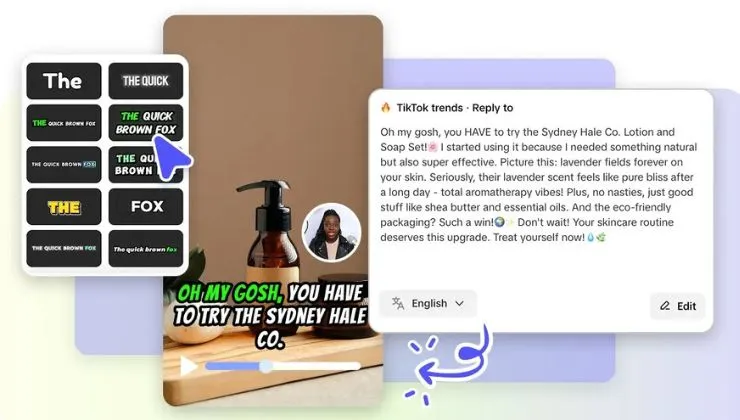
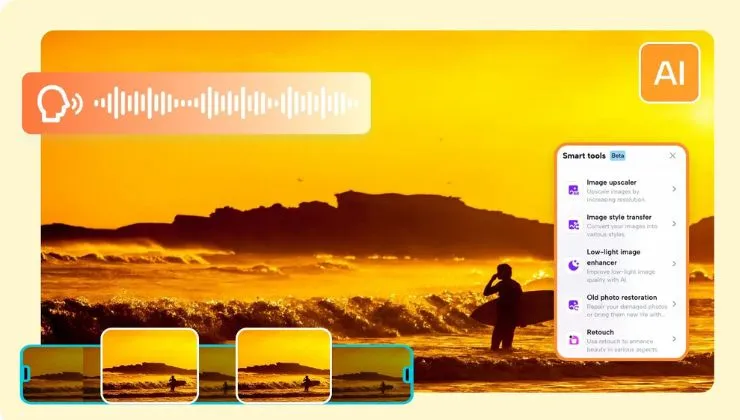
This is when Pippit comes in. Instead of requiring creators to write long scripts or even elaborate production notes, it can help creators turn these random ideas into visual sequences. With the help of Pippit’s AI video generator, creators can turn random ideas into well-structured video concepts in no time.
Instead of staring at a blank piece of paper wondering what to write, creators can already begin working on their ideas. The moment an idea is turned into a scene, a scene is turned into a sequence, and a sequence is turned into a video, creating it is no longer a confusing task.
When ideas feel exciting but impossible to organize
Most creators do not struggle with ideas. They struggle with organizing these ideas. An idea is exciting, but without a well-organized sequence of scenes, it remains abstract.
For instance, a creator might think of a product demo concept. They know that the video should have a good beginning, a product showcase, and a good ending. However, the process that gets them from the beginning to the ending is fuzzy. This is where visual planning comes in. It closes the gap between thinking about a concept and bringing it to life.
Why thinking in scenes is better than thinking in scripts
Traditionally, video creation is a linear process that starts with writing a script. Scripts, outlines, and dialogue writing have long been considered a necessary step in video creation. However, modern short-form video is different.
Short-form video platforms prioritize a fast-paced narrative with visual stimuli that transition the audience from one scene to another. This is easier to plan visually instead of writing it down.
Thinking in scenes enables video creators to concentrate on:
- What the audience sees first
- Where the audience’s attention should be directed next
- When the product appears in the scene
- How the video ends
By visualizing the scene instead of writing it down, the video creation process becomes much more intuitive.
Visual planning removes production stress
Another advantage that comes with the use of a storyboarding video is that it gives the creator a lot of confidence. This is because the creator will be able to visualize the video that they will create.
For instance, instead of the creator worrying about the various decisions that they make when it comes to the video that they want to create, the creator will be in a position to know exactly what the different scenes need to do.
Additionally, the creator will be in a position to plan the video in such a way that it will allow them to be experimental. This is especially when the creator is using Pippit, a free AI video generator.
From scattered thoughts to structured stories
Storyboarding turns your ideas into a visual plan. Instead of a vague concept floating in your mind, you suddenly have a plan.
A good storyboard will answer a number of critical questions:
- What does the viewer see first?
- What moment sparks curiosity?
- Where does the main message appear?
- How does the story conclude?
By answering these questions visually, you move from confusion to clarity.
This also helps teams collaborate better. Designers, editors, and marketers can all instantly understand the plan.
The creative advantage of faster video planning
In today’s fast-paced world, trends come and go quickly. This is especially true in the world of video creation. With trends changing fast, it is imperative that videos are updated regularly. This makes it crucial that video creation is fast.
In many cases, video creators spend too much time planning or rewriting scripts. This is where storyboards come in. With storyboards, the planning stage is faster.
In many cases, video planning can take too long. This is where storyboards help. With storyboards, video planning is faster. This enables video creators to create videos faster.
Faster planning does not necessarily mean that it is less creative. It is actually more creative.
Creating videos from your ideas with Pippit
Once the storyboard is created, it is time to create videos from your ideas. This is where Pippit comes in. With Pippit, it is easy to create videos from your ideas.
Below is how video creators can create videos from their ideas.
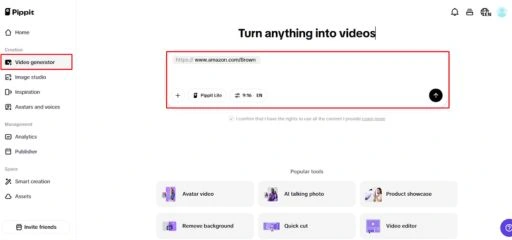
Step 1: Add any product link, media or photo
To start using Pippit, you need to input your idea in the Video generator section located on the left menu. You can input your idea, paste the link, or upload media such as PDFs, photos, or videos. Once you are done inputting the content, you can simply click the “Generate” button for Pippit to auto-generate the videos based on the input provided.
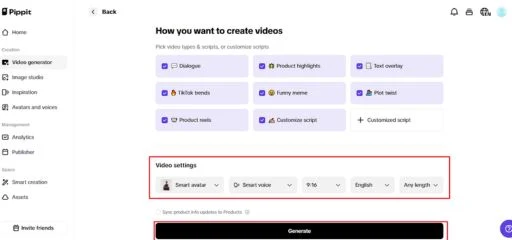
Step 2: Personalize your video
Pippit will auto-generate the video based on the input provided. You can customize the generated video by choosing the type of video you wish to create, the preferences for the video, such as the avatar, voice, ratio, language, and the length of the video. Once you are done, you can simply click the “Generate” button.
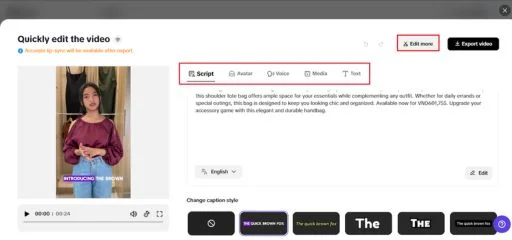
Inside the editing section, you can customize the generated video based on the ideas you created during the storyboarding section. You can trim the videos, add the text, add the transition, add the effects, add the voiceover, or add the background music. The editing section allows the creators to customize the videos exactly the way they imagined during the storyboarding section.
Step 3: Export or publish the video
Once the editing is complete, click the “Export” option to create the final video. You can opt for ”Publish” to share the video directly with the audience using platforms like TikTok, Facebook, or Instagram. On the other hand, you can opt for “Download” for future use or sharing the video through other platforms.
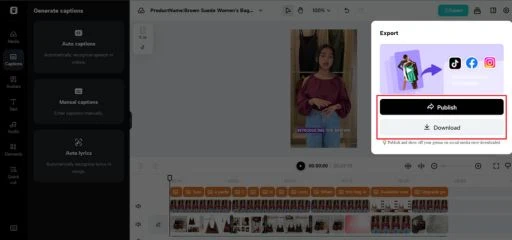
This is where the creator can share their content with the audience where they are most active.
Key Features of using Pippit’s AI capabilities for video generation
| Feature | What it does | Why it helps creators |
| Video generator | Converts ideas, links, or media into video drafts | Saves time by creating initial video structure instantly |
| Smart editing workspace | Allows trimming, transitions, effects, and voiceovers | Gives full creative control without complicated software |
| Multi-format export | Publish or download videos for multiple platforms | Makes cross-platform distribution simple |
| Automated previews | Generates scenes and layouts automatically | Helps visualize the final video before editing deeply |
| Flexible customization | Adjust avatars, voices, language, and aspect ratios | Allows creators to adapt content for different audiences |
These tools all work together to help close the gap from an idea to a finished piece of content.
When simple ideas become powerful visual stories
The main difference between struggling creatives and those with confidence is clarity. When you can envision your idea as a series of scenes, everything gets much easier. Filming becomes easier, editing becomes faster, and your storytelling gets stronger.
Storyboards aren’t just for planning. They’re for accelerating your ideas from your mind to the world without any extra friction.
Want to turn your next simple video idea into a structured visual story that’s engaging? Pippit’s got you covered. Plan visually, create your content faster, and turn your creative concepts into reality with Pippit.